


Instagram Collab Posts · 2026 Guide for Brands
Instagram Collab Posts · 2026 Guide for Brands
Instagram Collab Posts: How They Work and How to Get Sales.
Your collab gets the comments. Who answers them?
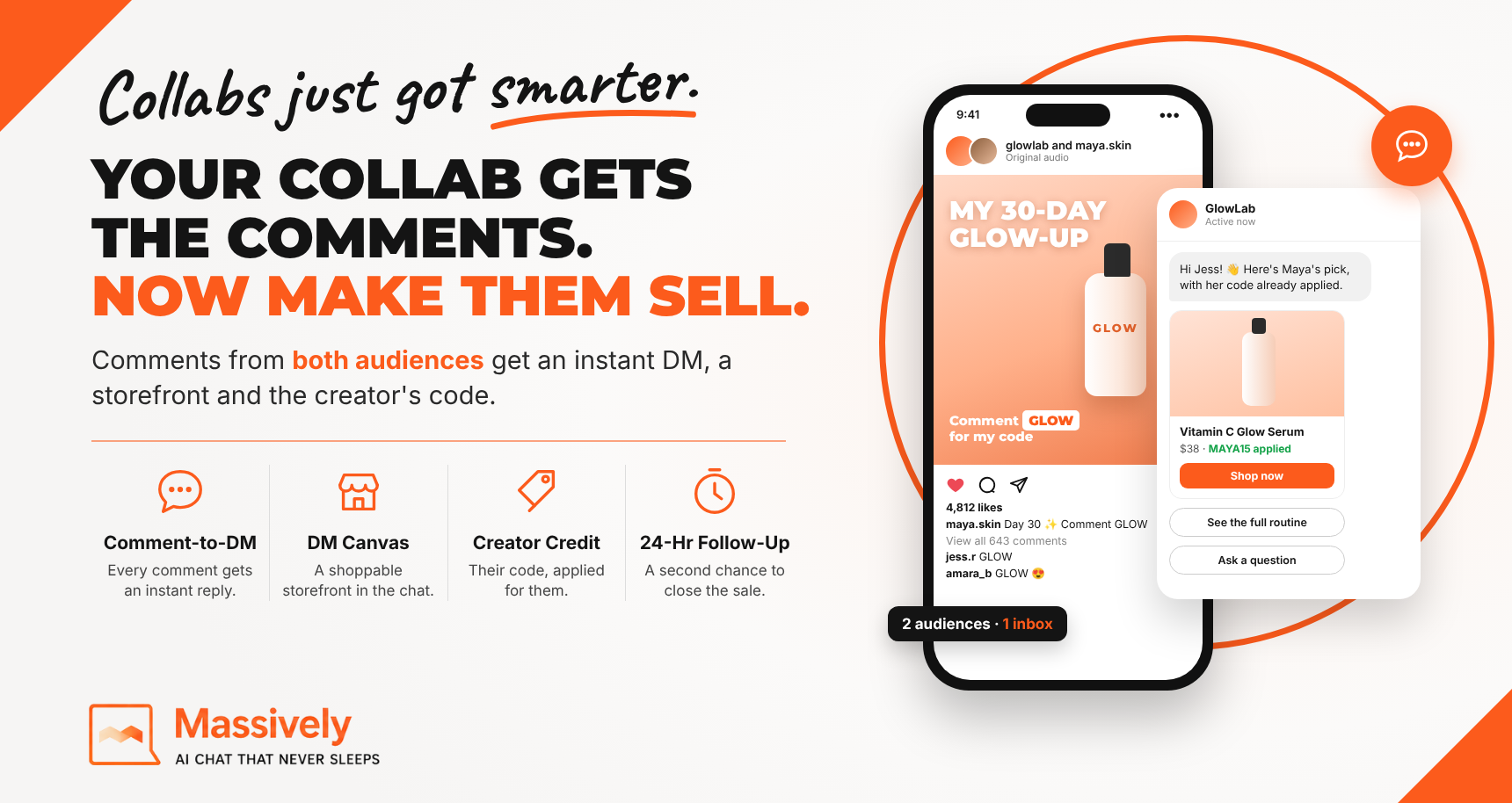
A collab puts your brand or product in front of a partner/creator’s audience. Then the comments pour in, “where do I get this?”, “code?”, “🔥🔥🔥” and most of them go nowhere. Here’s how collabs work, who owns the comments, and how to turn every one into a conversation and a sale.
No credit card required for Comment-to-DM · See pricing
73%+
Of brands studied used Instagram collabs in 2026
1
Shared comment thread across every collaborator
400%
More sign-ups with Comment-to-DM vs link-in-bio
24hr
Follow-up window after someone replies in DM
Quick answer: An Instagram collab post is one post or Reel that appears on two or more accounts at once, with one shared set of views, likes and comments. Brands use collabs to borrow a partner or creator’s reach, but most comments from the partner’s followers go nowhere. When the brand publishes the collab and runs Comment-to-DM on it, every comment becomes a private conversation with the brand, a shoppable storefront in the DM and a chance to follow up. The partner or creator doesn’t install or change anything.
Collabs are already everywhere. In an analysis of 3,791 Instagram profiles in the first half of 2026, Emplifi found that more than 73% of brands used collaboration posts (Emplifi). Most of those brands measure the result in views and likes.
This guide explains how collabs work and how to turn the comments into customers.
The basics
What is an Instagram collab post?
An Instagram collab post is a single feed post or Reel co-authored by two or more accounts. It shows on each account’s profile grid and in each account’s followers’ feeds. Instagram launched Collabs in October 2021. Both account names appear in the post header, and the post keeps one view count, one like count and one comment thread (Search Engine Journal).
Today the account that publishes can invite up to five collaborators, and each one has to accept before their name appears (Dash Social). Collabs work for feed posts and Reels. Paid or gifted partnerships still need Instagram’s paid partnership label.
In short: one post, several audiences, one shared pile of engagement.
Step by step
How do Instagram collabs work?
One account publishes the post and invites the others, and once they accept, the post lives on every profile at once.
1
Create the post. The publishing account uploads the photo, carousel or Reel and writes the caption.
2
Invite collaborators. On the tagging screen, choose Invite collaborator and pick up to five accounts.
3
Collaborators accept. Each invited account gets a request. Once accepted, its name appears in the header and the post shows on its grid.
4
Engagement is shared. Views, likes and comments from every audience land on the same post.
5
Boost it if you like. Brands can put eligible collab content behind partnership ads to reach more people.
Who owns a collab post?
The account that publishes the collab owns the post, even though it appears on every collaborator’s profile. That matters for automation. Instagram only lets a business send automatic private replies to comments on its own posts, Reels, stories, Lives and ads (Meta for Developers).
The takeaway: if a brand wants to act on the comments, the brand should publish the collab and invite the partner or creator.
The data
Why do brands use collab posts?
Brands use collabs because a collab puts their product in front of a partner or creator’s audience, inside a post those followers already trust, and the numbers show it lifts engagement.
| Finding | Source |
|---|---|
| More than 73% of brands studied used Instagram collaborations (3,791 profiles, Jan to Jun 2026) | Emplifi |
| Both brand-published and creator-published collabs earned more interactions than the same brands’ standard posts | Emplifi |
| Smaller brands got 5x more interactions on creator-published collabs than on their regular posts | Emplifi |
| In ecommerce and retail, creator-published collabs got more than 5x the shares and reposts of regular posts | Emplifi |
| An eBay collab Reel with Emma Chamberlain passed 1.4 million views, more than eBay’s other short videos | Fast Company |
There’s one gap in all of this. Emplifi’s research measured engagement and amplification, not sales. Collabs are very good at getting people to react. Very few brands have a plan for what happens after someone reacts.
The gap
The problem: collab comments go nowhere
Most collab comments never turn into a sale because nobody answers them and the buyer is sent off to a link in bio.
Picture a skincare creator’s collab Reel with your brand. Followers comment “where do I get this?”, “does it work on dry skin?”, “code?”. Here’s what usually happens next:
✕
The questions sit unanswered. The creator is busy and your social team can’t keep up with every thread.
✕
“Link in bio” sends people away. They leave the app, land on a page that isn’t about the post, and many never come back.
✕
You never learn who was interested. The comment was a hand raised, and nobody took down the name.
✕
The creator’s own tools can’t help you. Many creators already run comment-to-DM tools, but those send followers to the creator’s DMs, not yours. If you own the post and don’t have comment-to-DM tools running, the opportunity is lost for everyone.
The brand paid for the reach, in product, fees or time. The engagement it bought mostly disappears.
The fix
How to turn collab comments into sales
Publish the collab from the brand’s account, then let our Comment-to-DM, DM Canvas and an optional AI assistant take each commenter from comment to checkout. The creator just accepts the invite.
From comment to checkout
→
They comment GLOW
→
Instant DM from the brand
→
DM Canvas storefront with the creator’s code
→
Checkout on your store
Questions along the way go to the optional AI assistant. No purchase yet? A follow-up with the code goes out within the 24-hour window.
1. Comment-to-DM: every comment gets an answer
When someone comments your keyword (say, GLOW) on the collab, they get a private DM from the brand within seconds. It doesn’t matter whether they found the post through the creator or through you. Instagram allows one automatic reply per comment, sent within 7 days, and once the person replies you have 24 hours to keep the conversation going (Meta for Developers).
Because the brand owns the post, the creator’s own automation never touches it. There’s no keyword conflict and nothing for the creator to turn on or switch off.
2. DM Canvas: a storefront inside the DM
The DM doesn’t just send a link. It opens a swipeable, shoppable storefront right in the chat, with the products from the post, the creator’s discount code already applied and a buy button. The follower shops without leaving Instagram, and checkout happens on your own store.
Since the brand knows which collab the comment came from, it can show that creator’s code or link, so the creator still gets credit through ShopMy, LTK or whatever platform they use.
3. Optional AI: answers the questions that stop a sale
“Will this work for sensitive skin?” “When will it ship?” An AI assistant trained on your products and policies answers in the same DM, then points back to the storefront. Anything it shouldn’t handle goes to your team.
Brand-published or creator-published?
Emplifi found both brand-published and creator-published collabs earn a bigger engagement lift than a brand’s regular posts (Emplifi).
Creator publishes
A few more likes
Comments land on the creator’s post. The brand can’t automate replies, and buyers get sent to a link in bio.
Brand publishes
Every comment answered
A storefront in the DM, the creator’s code applied, a 24-hour follow-up and a list of people who raised their hand.
For posts meant to sell, publishing from the brand account is the better deal.
Setup
How to set up a collab that sells
Setup takes one account and five steps, and the creator only has to accept an invite.
1
Connect the brand’s Instagram account to Massively and build your DM Canvas storefront from your website or Shopify store.
2
Pick a keyword that fits the post, like GLOW or SHADE, and add the creator’s discount code or link to the storefront.
3
Publish the collab from the brand account using your video or photos (or the creator’s), and invite the creator as a collaborator.
4
Put the call to action in the caption and on screen, for example “Comment GLOW and we’ll DM you the shade guide and Maya’s code.”
5
Turn on follow-ups and the AI assistant if you want them, then watch comments, DMs, storefront clicks and sales by creator.
Try it on your last collab
Paste any collab post into Collab Capture and see what Comment-to-DM and DM Canvas would have done with its comments, plus a ready-made plan for your next launch.
Want to see the storefront on its own? Paste your website into the DM Canvas Preview and we’ll build one in about 30 seconds.
Common questions
FAQ
What is a collab post on Instagram?
A collab post is one post or Reel co-authored by up to six accounts: the account that publishes it plus up to five invited collaborators. It appears on every collaborator’s profile and shares one set of views, likes and comments.
Who owns the comments on a collab post?
All collaborators see the same comments, but the account that published the post owns it. Only that account can automate private replies to those comments.
Can you automate DMs on an Instagram collab post?
Yes, if your account published the collab. Instagram’s private replies work on your own posts and Reels, so a brand should publish the collab and invite the creator.
Does the creator need to use Massively?
No. The creator accepts the collab invite and that’s it. Their own tools keep working on their own posts.
Will the creator still get credit for sales?
Yes. The DM storefront can carry each creator’s discount code or tracking link, so sales are still credited through their affiliate platform.
Do people have to follow the brand to get the DM?
No. People who don’t follow the brand get the reply in their message requests, with a link back to the post they commented on. Saying “we’ll DM you” in the caption tells them where to look.
Does this work on Facebook too?
Comment-to-DM and DM Canvas work on Instagram and Facebook Messenger. Collab posts are an Instagram feature.
Sources
Instagram collaborations boost organic engagement, Emplifi, H1 2026 data
Creator-published Instagram collabs drive more engagement, Affiverse, September 18, 2026
Instagram is introducing a way for users to publish content together as a collab, Search Engine Journal, October 20, 2021
Boost engagement with Instagram collab posts, Dash Social
Growing together: the success of Instagram collab posts, Fast Company, August 6, 2025
Private replies, Meta for Developers
Already doing collabs?
Let the comments sell too.
See what your last collab missed, preview your storefront in 30 seconds, or book a demo.
✓ No credit card required for Comment-to-DM · ✓ Works on Instagram and Facebook · ✓ Free plan available